Transform Internal Actions to Accountable, Trackable Workflows
Centralize compliance actions into one structured workflow
Complinova Action Management offers a structured approach to the creation, assignment, scheduling, monitoring, review and closing of internal actions. It integrates tasks from essential compliance and risk exercises into a single repository and dashboard, enabling teams to stay in touch with what is being done and accountable for the action.
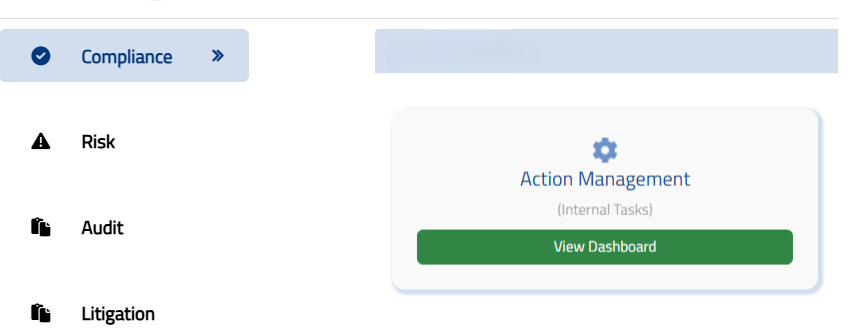
What is Action Management
Action Management is the process of creating, assigning, tracking, reviewing, and closing internal actions related to compliance, risk, audits, policies, SOPs, and controls.
Internal action management is related to actions that are initiated because of the organisation's internal policies, procedures, internal audits, compliance reviews, and risk controls, as opposed to actions that are directly mandate by external regulation.
Complinova is a centralised repository for tasks created by Regulatory Interface, Compliance Monitoring and Testing, Risk Assessment and Risk Register Mitigation. This allows teams to combine actions across multiple GRC activities in one consistent place to track and follow actions.
Action Management Module
Action Management module gives one central view of the status of the internal tasks. Filtering by action allows users to narrow down the list of actions and see only those that are applicable for a specific time frame, department, or other category.
The module also displays tasks in the following views: New, Unread, Updated, and All Tasks. The category-wise charts offer an alternative view of current internal tasks, and show how actions are spread out between the various categories.
Upload Multiple Tasks
If you have more actions to manage, Complinova also includes Upload Task, which enables you to upload more tasks at once with an Excel template.
This is helpful when a series of actions needs to be added to the platform from within the organization and aren't being created from the start.
Bulk upload tasks at once using a structured Excel template
Ideal for migrating existing actions into the platform
Save time when adding a series of actions quickly
Scheduling Frequency
All compliance tasks do not occur on the same timeline. Some of the actions are repetitive, others are done once. Complinova offers flexible Scheduling Frequency:
Daily
Recurring daily tasks
Weekly
Recurring weekly tasks
Monthly
Recurring monthly tasks
Yearly
Recurring yearly tasks
One-Time
Single occurrence tasks

Risk and Control-Based Action Management
Effective risk action management requires understanding why an action exists and what risk or control it relates to.
Complinova's Risk and Control section enables the user to link an action with a Risk Category, a Control Nature, a Control Details and a Risk Rating. This offers more context to the action and helps teams look at remediation activities in a risk and control perspective.
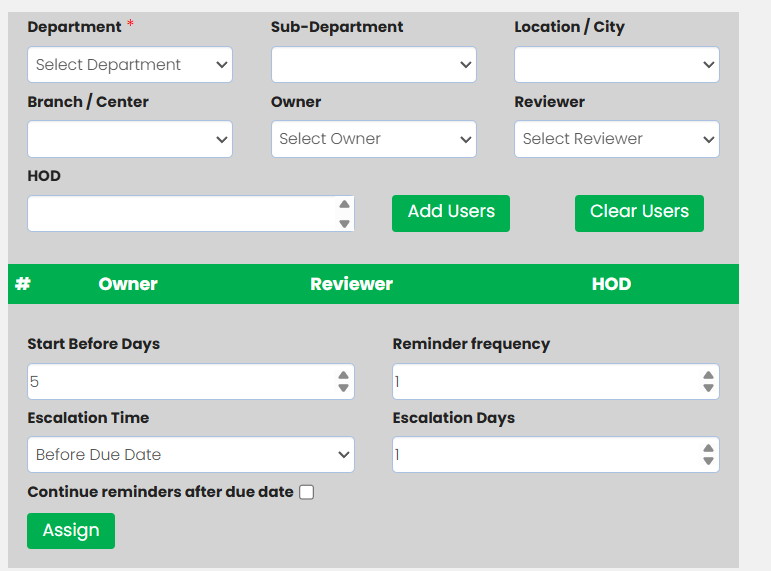
Assignees in the module can be assigned to Owners, Reviewers and Heads of Departments, users can be chosen by sub-department, location or branch. Several owners and reviewers may be assigned at any department and at any location if needed.
Reminders and escalations can be set up to assist follow-up according to rules programmed when the task is created. This will provide responsible teams with increased visibility of actions to attend to.
Link Action to Risk & Control

Query and Response
Finding the right actions to take isn't always easy. Owners/Reviewers may need to seek clarification prior to completion of task or may need to communicate with relevant compliance team.
The Query and Response feature allows the Owners and Reviewers to pose queries concerning tasks in the system. The questions will be displayed on the Admin Users' dashboard and can be answered directly in the platform.
This makes it easier to keep the context of the discussion along with the action it is referring to, as these actions are kept within the task workflow.
Task Audit History
When tracing back how an action turned out from an assignment to completion, it is essential to have a clear history.
Complinova keeps a Task Audit History which includes task activities, queries and related responses. This gives a baseline to reference and review activity related to individual tasks.
For compliance and audit teams, this helps with making things more traceable, as the necessary task activity remains in the system and not in a separate communication/tracking document.
Audit Trail
Status Dashboard
The Status Dashboard shows a summary of task compliance and progress. Information can be filtered by regulator, Compliance/Contract Reference, department and date range for relevance of information actions.
The dashboard displays visibility of pending tasks, completed tasks, tasks in progress and on-time versus delayed tasks completion. Data is provided in downloadable charts for analysis and subsequent follow up.
A detailed grid view also displays assigned tasks and facilitates downloading of tasks to follow up. Task statuses are categorized in Pending, In-Queue, In Progress and Completed.
Know what Action Status at a Glance means
The dashboard displays visibility of pending tasks, completed tasks, tasks in progress and on-time versus delayed tasks completion. Data is provided in downloadable charts for analysis and subsequent follow up. A detailed grid view also displays assigned tasks and facilitates downloading of tasks to follow up. Task statuses are categorized as below.
Pending
Tasks assigned but not yet started, completed or approved.
In-Queue
Tasks that are pending but upcoming of recurring activities.
In Progress
Those tasks that are partly done, and it displays how much percent of the task has been completed.
Completed
Tasks that have been completed.
Timely Completed
Tasks completed within due date.
Late Completed
Tasks that are completed after the due date.
A structured status view can assist compliance, risk and business teams with understanding the status of actions and determine if there are tasks that still need to be addressed.
Key Benefits of Action Management Software
Discover how Complinova transforms compliance action management with structured workflows and clear accountability.
Centralized Action Tracking
Collate and store all internal compliance, audit, risk and remediation measures in a single structure rather than having to manage multiple trackers.
Clear Ownership
Give responsibility for actions to owners, reviewers, and responsible departments to create accountability throughout the action life cycle.
Better Deadline Management
Increase visibility of upcoming and overdue compliance tasks using scheduling, reminders, and escalations.
Risk-Based Visibility
Link action with risk category, controls and risk rating to provide additional context for remediation and risk mitigation activities.
Audit-Ready History
Keep the tasks and task results, as well as related evidence and reference documents, up to date for easier review and accountability.
Action Status Visibility
Navigate to dashboards, filters, charts and reports to gain insight into overall action status and activities requiring follow up.
What makes Complinova so great for Action Management?
The battle to keep up a unified perspective of ownership and progress in the management of compliance actions can be difficult when compliance is tracked across disconnected spreadsheets, emails and individual trackers. Complinova unifies Action Item Management, compliance task tracking, risk context, task assignment, queries, audit history and status reporting in one workflow.
The outcome is a more methodical way of working with internal actions, from creating and assigning them to monitoring, reviewing and completing.
Compliance Action Management, Audit Action Tracking, Corrective Action Management and Risk Mitigation Tracking are all options that your company might be looking for, and Complinova offers both visibility and structure for more effective action management.
Bring Structure to Every Compliance Action
Provide your compliance, risk, audit and business teams with a single source of truth for managing internal actions, delegating responsibility, tracking progress, and reviewing task history.
Explore Complinova Action Management or request a demo to see how the module can fit into your organization's GRC workflow.
Frequently Asked Questions
Find answers to common questions about Complinova Action Management.
Action Management is a tool for organizations to help create, assign, track, review and close internal compliance and risk related actions.
Complinova allows teams to develop or import tasks, assign owners and reviewers, add deadlines and track progress on a single platform.
Yes. Tasks can be configured as Daily, Weekly, Monthly, Yearly or One-Time activities.
Tasks can be associated with Risk Category, Control Nature, Control Details and Risk Rating to facilitate risk-based tracking.
The Status Dashboard displays Pending, In Progress, Completed, Timely Completed, and Late Completed tasks to make it easier to monitor and follow up on tasks.
